.png?width=185&height=50&name=Full%20Passion.io%20logo%20(white).png)
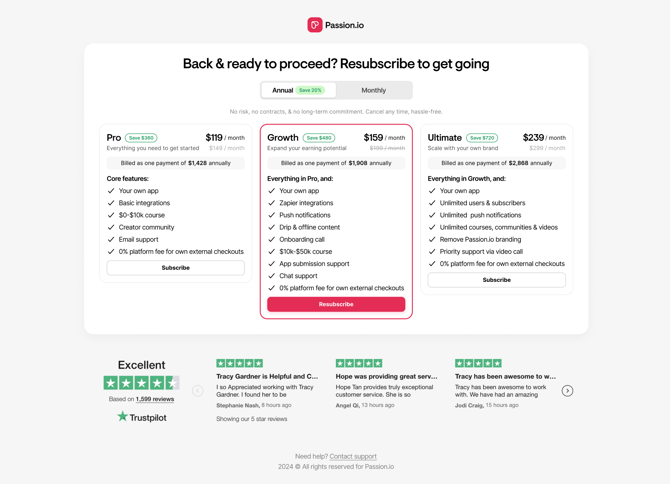
Why am I seeing this page?
The Subscription Reactivation screen will automatically appear when your subscription meets any of these conditions:
-
Payment failure: Your latest subscription renewal didn’t go through (for example, due to an expired card or insufficient funds).
-
Manual cancellation: Your subscription was previously set to “Cancel” and the current billing period has now ended.
How to Reactivate Subscription
Past-Due Subscription
When a subscription has an open invoice, the subscriber will receive an automated email with these details:
-
From: failed-payments@passion.io
-
Subject: $XX payment to Passion.io was unsuccessful
-
Body: A secure link to update billing information
To reactivate your subscription and keep your current plan:
-
Click the Update billing information button in the email, or log in to the Billing Portal using this link.
-
Update your payment method by following the on-screen prompts, or click Add payment method to add a new one.
-
After you update your payment details, Stripe will automatically attempt to charge your card.
-
Once the payment is successful, your account access will be fully restored.
Cancelled Subscription
The platform streamlines the return process by providing a direct path from login to checkout.
-
Log in to your Passion.io account with your usual credentials.
-
After logging in, you’ll be automatically taken to the Subscription Reactivation page.
-
Choose your preferred option from the available subscription plans.
-
Click Proceed to checkout to confirm your selection.
-
Complete the payment on the checkout page. Once the payment is successful, your account access will be restored.
Please note that legacy subscription plans can’t be reactivated. If a canceled account was on an older plan, you’ll need to choose one of the current subscription options shown on the reactivation screen in order to restore access.
Data & Content Policy
While reactivation restores account access, there is no guarantee that previous app content, user data, or custom configurations remain preserved after an extended period of inactivity. Maintaining an active subscription is the only way to ensure 100% data continuity.